 Intellihome
Docker
What it is: A platform for running applications in containers: isolated processes started from prebuilt images. In a homelab it's the standard way to run services like Node-RED, Home Assistant or an MQTT broker without installing them into the system. Docker docs Current versions are Docker Engine 29.8.2 and Compose 5.6.0 (09–10/2026). Docker docs
Core concepts
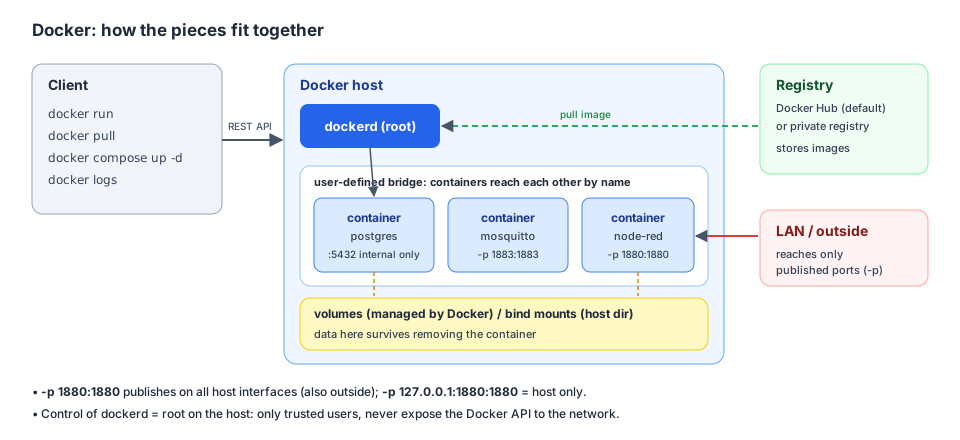
Client, daemon, registry, containers, networks and volumes. Own diagram (Synthesis) based on Docker docs.
- Image: a read-only template made of layers. Pulled from a registry; Docker Hub is the default. Docker docs
- Container: a running instance of an image. Anything not in a volume or bind mount disappears when the container is removed. Docker docs
- Volume: storage managed by Docker, preferred for data. Bind mount: a host directory mounted into the container, good for configuration. Docker docs
- Network: on a user-defined network containers find each other by name; on the default bridge only by IP. Docker docs
- Compose: a whole set of services in one
compose.yaml. Docker docs
Compose in practice
Synthesis based on Docker docs and Node-RED docs: Node-RED and an MQTT broker on one user-defined network, data in volumes, the Node-RED port on the LAN only.
services:
  node-red:
    image: nodered/node-red:5.0.7      # pinned version instead of latest
    restart: unless-stopped
    ports:
      - "1880:1880"                    # 127.0.0.1:1880:1880 = host only
    volumes:
      - node_red_data:/data
  mosquitto:
    image: eclipse-mosquitto:2         # Mosquitto 2.x
    restart: unless-stopped
    volumes:
      - mosquitto_data:/mosquitto/data
volumes:
  node_red_data:
  mosquitto_data:
docker compose up -dstarts the stack in the background. Compose creates its own project network, so Node-RED reaches the broker asmosquitto:1883(Synthesis: the project network is user-defined; DNS by name per Docker docs).- The default file name is
compose.yaml;docker-compose.ymlworks for backward compatibility. Docker docs
Restart policy
| Value | Behaviour |
|---|---|
no |
no restart (default) |
on-failure[:n] |
only on error (non-zero exit code), optionally max. n attempts |
always |
always. A manually stopped one comes back only after a daemon restart |
unless-stopped |
like always, but a manually stopped one stays off even after a daemon restart |
The policy only applies after a successful start (container up for at least 10 s). Docker docs Umbrel uses on-failure for its apps. Umbrel sources
Data and backups
- Back up volumes, not containers. Example from the docs Docker docs:
docker run --rm --volumes-from mynodered -v $(pwd):/backup ubuntu tar cvf /backup/backup.tar /data
- A bind mount over a container directory that already has files hides them. Docker docs
- Databases: copying files while running isn't enough. Back up PostgreSQL with
pg_dump, see PostgreSQL. PostgreSQL docs
Networking and ports
- A container port is unreachable from outside until you publish it with
-porports:. Docker docs -p 1880:1880opens the port on all host interfaces, i.e. also beyond the host.-p 127.0.0.1:1880:1880limits it to the host. The docs explicitly call port publishing "insecure by default". Docker docsnetwork_mode: host: the container shares the host network, soports:is meaningless and the app's port is directly on the LAN. Umbrel uses this for HA, Homebridge and Node-RED. Umbrel sources Synthesis: useful for mDNS and HomeKit discovery, but protection then depends on the app's own login.
Logs
The default json-file driver does not rotate logs and can fill the disk. local is recommended Docker docs:
{ "log-driver": "local" }
It goes into /etc/docker/daemon.json. After restarting Docker it applies to newly created containers; existing ones don't pick up the new setting automatically. Docker docs
Security
dockerdruns as root. Whoever controls Docker effectively controls the whole host, because a container can mount the host's/. Give access only to trusted users. Rootless mode exists. Docker docs- Never expose the Docker API (socket) to the network. Synthesis: the same goes for mounting
/var/run/docker.sockinto containers. privileged: true(e.g. HA on Umbrel for USB adapters) gives the container access to host devices. Umbrel sources
Gotchas
latestis not a version. Synthesis: pin a tag (or a digest like Umbrel does) and update deliberately, e.g. because of Node-RED 5.- On the default bridge containers don't find each other by name; use your own network or Compose. Docker docs
- The uid inside the container must match the bind mount owner. Node-RED runs as uid 1000. Node-RED docs
Related
Sources
- Docker docs: official Docker documentation (Engine 29.8.2, Compose 5.6.0).
- Umbrel sources: how umbrelOS uses Docker.
- Node-RED docs: Node-RED in Docker.