 Intellihome
Umbrel Home
What it is: A home server from Umbrel running umbrelOS, a self-hosting system with a web UI and a store of 300+ apps. Every app runs as a Docker Compose project. Umbrel sources
Specifications (current model)
According to the vendor Umbrel sources:
| CPU | Intel N150, 4 cores, up to 3.6 GHz, 6 W TDP, active cooling |
| RAM | 16 GB DDR5 |
| Storage | NVMe SSD 1, 2 or 4 TB |
| Network | Gigabit Ethernet (USB 2.5GbE adapters supported), Wi-Fi, Bluetooth |
| USB | 3× USB-A 3.0 (5 Gb/s) |
| System | umbrelOS, UI at http://umbrel.local |
| Backups | built in, to a USB drive or NAS |
umbrelOS
- Version 2.0.0 was released 2026-09-22. You could move to 2.0 from 1.7.4+ via the beta program. Umbrel sources
- A standalone OS that can't be installed on top of an existing Linux. It also runs free on x86 PCs, Raspberry Pi 5 (boot from NVMe or USB, not microSD) and in VMs, with the same features as on Umbrel Home. Umbrel sources
- Licensed under PolyForm Noncommercial 1.0.0: personal and non-profit use is fine. Umbrel sources
How Umbrel runs apps
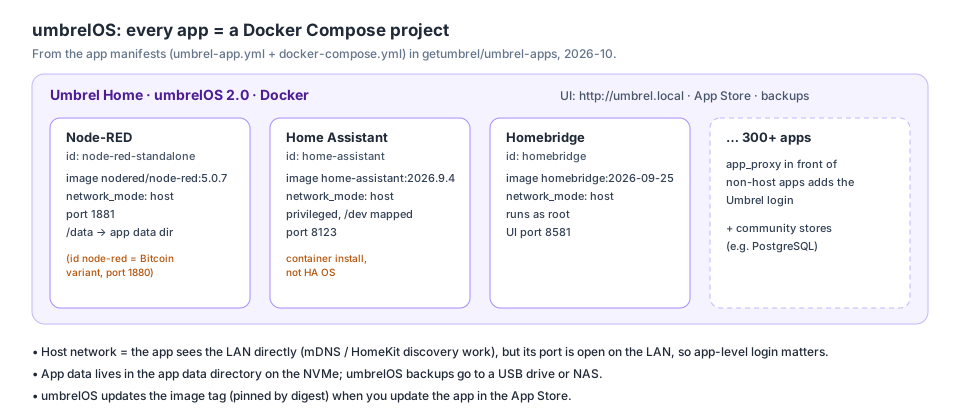
Node-RED, Home Assistant and Homebridge according to the Umbrel store manifests. Own diagram (Synthesis) based on Umbrel sources.
- Each app has an
umbrel-app.ymlmanifest (id, version, port) and adocker-compose.yml. The image is pinned by digest and data lives in the app directory. Umbrel sources - Smart-home apps run with
network_mode: host, so their ports are directly on the LAN. Umbrel sources Synthesis: that's required for HomeKit and mDNS discovery, but in-app login then matters (see Docker).
Smart-home apps in the App Store
| App (id) | Version 10/2026 | Port | Note |
|---|---|---|---|
Node-RED (node-red-standalone) |
5.0.7 | 1881 | the regular variant, no dependencies |
Node-RED (Bitcoin) (node-red) |
5.0.7 | 1880 | depends on Bitcoin, Electrs and Lightning, behind the Umbrel login |
Home Assistant (home-assistant) |
2026.9.4 | 8123 | container install, privileged, /dev mapped |
Homebridge (homebridge) |
2.4.0 | 8581 | runs as root |
Source: Umbrel sources.
Watch out for:
- Two Node-RED apps. For a smart home the right one is
node-red-standalone. The Bitcoin variant has access to Bitcoin Core and LND, and the vendor warns about third-party nodes. Umbrel sources - Home Assistant on Umbrel is a container install, not HA OS. A container install has no HA apps (formerly add-ons). HA docs Mosquitto, Node-RED and other services therefore run as separate Umbrel apps. USB adapters (Zigbee) must be mapped into the container. Umbrel does that via
/devandprivileged. Umbrel sources ZBT-2 docs - Updating an app = a new image version. That's how Node-RED got to 5.0.7. Read the release notes and back up before updating. Synthesis based on Node-RED docs.
Community app stores (e.g. PostgreSQL)
- Apps that aren't in the official App Store can be installed from community app stores. A store is a third-party GitHub repo that you add in umbrelOS by pasting its URL. Umbrel sources
- Community stores distribute apps without approval in the official store. Umbrel sources Synthesis: the store's author, not Umbrel, is responsible for the app's quality, security and updates. Before installing, check its repo: who maintains it, how often it's updated and which Docker image it uses.
- PostgreSQL isn't in the official store and is installed from a community one. Umbrel sources Watch the version: from PostgreSQL 18 the data location in the Docker image changed, see PostgreSQL. Apps like Node-RED then connect to PostgreSQL to store data.
Backups
- umbrelOS can back up to a USB drive or NAS. Umbrel sources
- Synthesis: for Node-RED what matters is
/data(flows, credentials,settings.js).
Gotchas
- An RPi 5 with umbrelOS needs to boot from NVMe or USB, not microSD. Umbrel sources
Related
Sources
- Umbrel sources: umbrelOS README, app manifests, product page.
- Docker docs: the Docker the apps run on.
- ZBT-2 docs: mapping a USB adapter into HA Container.