 Intellihome
Node-RED
What it is: An open-source tool for "low-code" programming of event-driven applications. You build logic in the browser from nodes connected by wires, with messages (msg) flowing between them.1 In the smart home it mainly serves as a second automation engine next to Home Assistant: it talks to HA over the WebSocket API and also handles MQTT, HTTP and hundreds of other integrations from the palette.2 The current release is Node-RED 5.0.7 (09/2026), which requires Node.js 22.9+.1
Node-RED or HA automations?
Synthesis (unsourced, common community practice):
| Situation | Rather HA automation | Rather Node-RED |
|---|---|---|
| Simple "when X, do Y" | ✓ | |
| Branching, waiting, timers, several conditions | ✓, the logic is visible in the graph | |
| Working with data (JSON, HTTP APIs, transformations) | ✓ | |
| Integrations outside HA (MQTT, HTTP endpoints, DB) | ✓ | |
| Must work without an extra process | ✓ |
Node-RED is one more process to update, back up and secure (see below).
Core concepts
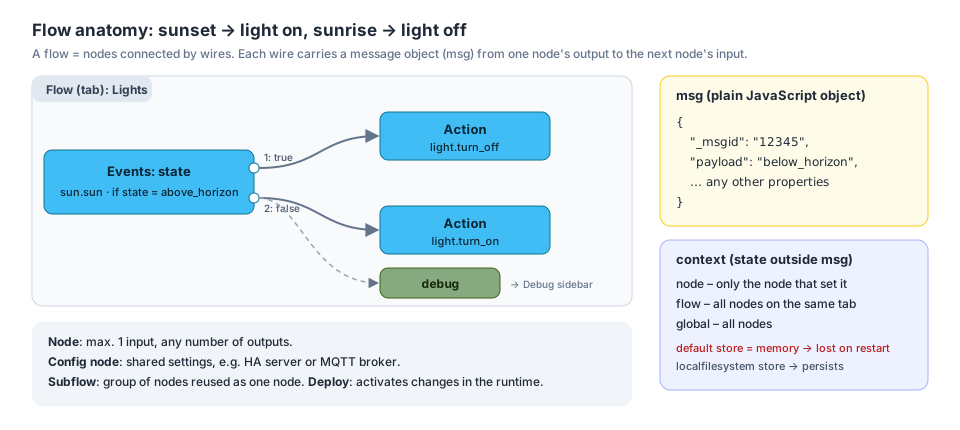
Flow, nodes, the msg message and context on a "light by the sun" example. Own diagram (Synthesis) based on Node-RED docs1 and2.
- Node: the building block. Triggered by a message from the previous node or by an external event (HTTP, timer…). At most 1 input and any number of outputs.1
- Flow: an editor tab; informally also one set of connected nodes.1
- Message (
msg): a plain JavaScript object. By convention the main data is inmsg.payload; Node-RED addsmsg._msgid.1 - Config node: shared configuration, e.g. the connection to an HA server or MQTT broker. Not shown in the workspace; it's in the Configuration nodes sidebar.1
- Context: state outside messages, scoped
node,floworglobal.1 - Subflow: a group of nodes packed into one reusable node.1
- Deploy: editor changes take effect only after deploying.
Editor
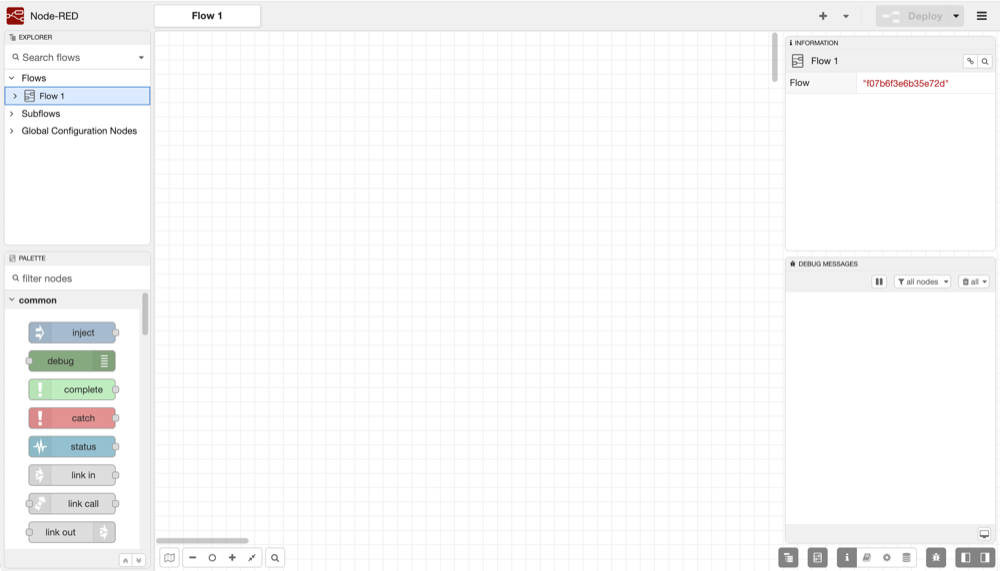
The Node-RED 5 editor: Explorer (flows, subflows, config nodes) and the node Palette on the left, the workspace in the middle, Information and Debug messages on the right, Deploy at the top. Source: Node-RED docs1 (screenshot from the docs, 2026-06).
- New nodes are installed via the Palette Manager (menu → Manage palette) or
npm installin the Node-RED directory.1,2 - If a node install fails with
EBADENGINE(a dependency wants a newer Node.js than the image has), see Node-RED: EBADENGINE. - The Debug node and sidebar show the full message structure. A button copies the path to a property (e.g.
payload.Phone[2].type) to paste into a Change node.1
Connecting to Home Assistant

How Node-RED and HA talk to each other. Own diagram (Synthesis) based on HA nodes docs2.
- Install the nodes
node-red-contrib-home-assistant-websocket(Node.js 20+, Node-RED 3.1.1+, HA 2024.3+). The community HA Node-RED add-on has them preinstalled.2 In HA 2026 add-ons are called Apps (Settings > Apps).3 - Create a token: in your HA profile → Create Token (long-lived access token). The user must be in the administrators group. A separate HA user for Node-RED is recommended so you can see what it changes.2
- Server config node: Base URL (e.g.
http://<ha>:8123) and the token. With the add-on, just tick "I use the Home Assistant Add-on".2 - Verify the connection with an Events: all node (green "connected" status), then delete it for performance and use specific nodes.2
Most used nodes2:
- Events: state / Trigger: state: start a flow when an entity's state changes. The entity can also be a regex or substring; "If State" splits the output into true/false; "For" sets how long the state must last.
- Current State: gets an entity's current state mid-flow.
- Action: calls an action in HA (formerly "call service"), e.g.
light.turn_on. - Get History, Fire Event, Wait Until, Webhook, API: advanced use.
- Entity nodes (Sensor, Switch, Button…) create an entity in HA. They need the
hass-node-redcustom integration in HA (HACS). Fill in the friendly name before the first deploy, otherwise you getsensor.nodered_<id>.
First automation example2: Events: state on sun.sun with If State above_horizon. True output → Action light.turn_off, false output → Action light.turn_on. It matches the "Flow anatomy" diagram above.
HomeKit: node-red-contrib-homekit-bridged (NRCHKB)
The package through which Node-RED exposes devices to Apple Home (HomeKit) and lets you control them with Siri too.
- The nodes imitate HomeKit devices inside Node-RED. A message into a node sets the state in the Home app; a command from Home or Siri arrives in the flow as a message.4
- Nodes: Bridge (one bridge with several devices), Standalone (a standalone accessory), Service / Service 2 (a specific service, e.g. a light or sensor), Status.4
- Synthesis: HomeKit discovers devices via mDNS on the local network. That's why on Umbrel the
Node-REDapp withnetwork_mode: hostworks.5
Compatibility with Node-RED 5 / Node.js 24
The Node-RED 5.0.7 image (including the one on Umbrel) runs on Node.js 24. The stable NRCHKB 1.7.3 (01/2025) has no official Node.js 24 support; the issue is open. Version 2.0.0, meant for Node-RED 5, is still only a release candidate (2.0.0-dev.12) and has an open bug with Service nodes in subflows.4
Synthesis: as long as HomeKit works, don't update NRCHKB blindly. Before updating Node-RED or NRCHKB, back up/dataand watch for the stable 2.0.0 release. Mind its breaking changes (no more custom mDNS, CameraControl).
Working with messages
- Change node: Set, Change (search and replace), Delete, Move. It can also read and write flow and global context and compute with JSONata. Enough for most edits without code.1
- Function node: JavaScript over
msgfor more complex logic.1
// multiple outputs: return an array (null = nothing on that output)
if (msg.topic === "banana") {
    return [null, msg];
}
return [msg, null];
Example from Node-RED docs1.
return nullends the flow. A function must return a message object, not a number or string.1- A new object instead of
msgdrops the original properties. E.g. HTTP In/Response needsmsg.reqandmsg.respreserved.1 - Asynchronous code sends messages via
node.send().1 - Logging via
node.log(),node.warn(),node.error()(warn and error also appear in Debug).node.error("…", msg)triggers a Catch node on the same tab.1
Context and state
- The default context is memory-only and disappears on restart. For persistent values, set in
settings.js1:
contextStorage: {
    default: { module: "localfilesystem" }
}
- Data then lives in
~/.node-red/context/and is written every 30 s. Memory and file stores can be combined.1 - State needed on one tab only belongs in
flow, notglobal. Alternatively keep state outside Node-RED (retained MQTT, a database).1
Installation
- HA app (add-on): the simplest route on HA OS; HA nodes are preinstalled.2
- Umbrel: the
Node-REDapp (node-red-standalone, port 1881). Don't confuse it with "Node-RED (Bitcoin)".5 - Docker1:
docker run -it -p 1880:1880 -v node_red_data:/data --name mynodered nodered/node-red
- All data (flows, settings.js, installed nodes) is in
/data, so always map a volume. - The process in the container runs as uid 1000. With a bind mount, the host directory must be owned by 1000:1000.
- The image is Alpine-based. For nodes with native modules there's a Debian variant since 3.1.0.
- Synthesis: in practice this belongs in a
docker-compose.ymlwithrestart: unless-stoppedand a pinned version tag instead oflatest. - npm:
sudo npm install -g node-red. Node-RED 5 needs Node.js 22.9+, 24 is recommended.1
Security
The editor has no login by default. Anyone who reaches port 1880 can change and deploy flows.1
- Login: in
settings.jsuncommentadminAuthand add users with a bcrypt password hash.node-red admin hash-pwcreates the hash. Permissions are*(everything) orread. OAuth/OpenID is possible too.1
adminAuth: {
    type: "credentials",
    users: [{ username: "admin", password: "<bcrypt-hash>", permissions: "*" }]
}
- HTTPS: the
httpsoption with a PEM key and certificate. Since Node-RED 5, certificates can also be loaded from environment variables.1 - HTTP In nodes and the dashboard are protected by
httpNodeAuth.1 credentialSecret: credentials in flows are encrypted. Without your own key a system key is used, and if it's lost the credentials are gone for good.1- Synthesis: don't expose port 1880 to the internet. Handle remote access via VPN or a reverse proxy with authentication. The HA token in Node-RED is an admin token; protect it like HA itself.
Backups and versioning
- Back up the whole
/data(Docker) or~/.node-red. While running:docker cp mynodered:/data <target>.1 - Projects: flows as a Git repository with history. Enabled in
settings.js(editorTheme.projects.enabled: true).1 - Synthesis: without a backed-up
credentialSecret, stored credentials (HA token, MQTT password) won't work after a restore.
Tips for structuring flows
- One tab = one logical unit. For a home, by room or by function (lights, heating).1
- Reuse via Link nodes (jump between tabs, only at the start or end of a flow) or Subflows (own node; each instance has its own context). Subflow properties work as environment variables, e.g.
${MY_TOPIC}.1 - Deploy only changes: Deploy → Modified Flows or Modified Nodes, so not all flows restart.2
Gotchas
- Upgrading to 5.x: check the Node.js version first (22.9+). The 4.1.x line still gets fixes, so there's no rush.1
- Node-RED 5 changed the editor significantly. Older guides and screenshots look different.1
- In-memory context is lost on restart or update.1
- The "State Type" option in Events: state is deprecated and will be removed in package 1.0.0. Use output properties.2
- If new entities don't show up in autocomplete, untick "Cache Autocomplete Results" in the server config and restart Node-RED.2
Integrations
- Home Assistant via the WebSocket API and the
hass-node-redcustom integration - MQTT: MQTT in/out nodes with a broker config node
- Zigbee2MQTT: Zigbee devices via MQTT
- PostgreSQL: long-term data storage
Related
Sources
- Node-RED Documentation + release notes ↗ — official Node-RED documentation and release notes (version 5.0.7).
- node-red-contrib-home-assistant-websocket (documentation) ↗ — documentation of the HA nodes (v0.81.0).
- Home Assistant Connect ZBT-2 (Nabu Casa Support) ↗ — HA add-ons renamed to Apps.
- node-red-contrib-homekit-bridged (NRCHKB): README, npm, issues ↗
- umbrelOS / Umbrel Home (README, app store, product page) ↗