 Intellihome
Zigbee
What it is: A low-power wireless mesh protocol for smart-home devices, built on IEEE 802.15.4. It is maintained by the Connectivity Standards Alliance (CSA). In HA it is handled by ZHA or Zigbee2MQTT. Practical advice on the coordinator, interference, backups and migration is sourced from ZBT-2 docs1. The general protocol description is based on the Zigbee2MQTT documentation2.
Key features
- PHY/MAC: IEEE 802.15.4, typically 2.4 GHz, low power.2 Channels 11–26.3
- Network roles:2
- Coordinator: a network has exactly one. It is a special router that forms the network: it picks the channel, PAN ID and security mode.2 It pairs devices and keeps the routing table.3 The network key is stored on the coordinator adapter.1 It's a USB adapter (e.g. Connect ZBT-2) or a network coordinator (see the SLZB section below).
- Router: forwards traffic and must not sleep, so it's unsuitable for batteries. It stores messages for its children and lets new devices join.2 It cannot form a network itself.3 Mains-powered devices (plugs, bulbs) are more likely routers. A router usually accepts at least 5 end devices.1
- End device: battery devices (sensors, buttons). It doesn't forward traffic and may sleep. It has a single parent, typically the nearest device when paired, and communicates only through it.2,1
- Endpoints: work like ports in TCP/IP; e.g. a 3-gang switch has one radio and three endpoints.2
- Application layer, ZCL (Zigbee Cluster Library): a cluster is a type of communication with a numeric ID, in a client or server variant. E.g. On/Off: the light is the server, the switch the client. There are also clusters for identification, configuration, groups and scenes.2
- Pairing: joining must be permitted (permit join). In Zigbee2MQTT the network opens for 254 s, and you can pick a specific router for the device to join through.2
- Binding: devices control each other directly without HA or Zigbee2MQTT, e.g. dimmer → bulb or group. It's smoother and works even when HA or the coordinator is down. Reporting is set up along with binding, so the target reports state changes.2
- Groups and scenes: a message to a group is broadcast to all members. Scenes remember settings (brightness, blind height).2
- Green Power: ultra-low-power devices (often battery-free). Their messages must be translated by a "proxy" router, and they don't support binding.2 ZHA doesn't support them.1
- Zigbee vs. Thread on one adapter: newer HA adapters (ZBT-2) support Zigbee 3.0 and Thread, but only one protocol at a time. You switch between them.1 Multi-radio adapters (e.g. SLZB-MR3) have two radios and can do both at once.4
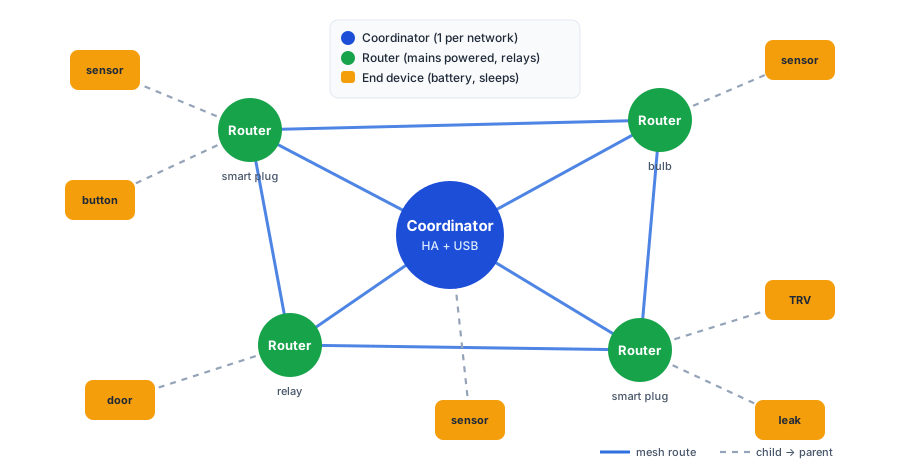
Zigbee mesh topology: routers (mains powered) form the mesh, battery end devices hang off a parent. Own diagram (Synthesis).
Coordinator placement and interference
Based on ZBT-2 docs1. The advice is written for the ZBT-2, but it is a 2.4 GHz radio, so it applies in general.
The signal is disturbed or blocked by:
- USB 3.0 ports and SSDs
- other transmitters (Wi-Fi routers, computers)
- metal (rack enclosures, wall brackets)
- wire mesh, thick walls, water (an aquarium)
- external SSDs and HDDs, 2.4 GHz devices and SBCs such as a Raspberry Pi1
Keep the coordinator away from them. In practice: don't plug it straight into a server in a rack.
Why it matters: an 802.15.4 radio uses Clear Channel Assessment. It listens before transmitting, and if there is other traffic or interference in the band (not just Zigbee), it stays silent. An Intel whitepaper from 2012 describes the USB 3.0 interference.1
The antenna should stand vertically. The ZBT-2 signals a bad orientation by fast-blinking its LED and must not be mounted sideways on a wall.
The ZBT-2 specifically requires a USB 2.0 port on the HA hub.5
A USB extension cable ships with the ZBT-2 and it's important to use it. If it isn't enough, try a longer or shielded cable.1 According to Zigbee2MQTT, 50 cm is enough, a USB 2 port is better than USB 3, and a nearby HDMI port interferes too. Rotating the adapter can also help.2
Network key, backups and migration (ZHA)
- The network settings, including the private network key, are stored on the coordinator adapter. This does not apply to Thread, where HA holds everything.1
- A ZHA backup exports the coordinator settings. A copy is included in HA backups. HA makes it every time ZHA starts and then automatically every 24 h.5
- Synthesis: the HA backup is what lets you move the network to a new adapter without re-pairing devices. Before replacing or resetting an adapter, make sure you have a fresh HA backup.
- Supported migrations in HA1 Step by step: Zigbee coordinator migration.
- existing Zigbee network → new adapter
- Zigbee2MQTT → ZHA
- deCONZ → ZHA
- ZHA via a Zigbee2MQTT backup
- Removing the adapter: want to keep the network → migrate it to another adapter first. Don't → remove the hardware integration, then ZHA. The adapter is not reset by this and the key stays on it.5 Only the reset button on the adapter wipes the key, see Connect ZBT-2.1
Gotchas
- Shares 2.4 GHz with Wi-Fi. Choose a Zigbee channel that does not overlap Wi-Fi channels.3 Zigbee2MQTT recommends ZLL channels 11, 15, 20 or 25.2 Of these, 15, 20 and 25 sit outside Wi-Fi 1/6/11, see the diagram below. Keep the coordinator away from the Wi-Fi router.3 Wi-Fi in 2.4 GHz has only 3 non-overlapping channels; the Wi-Fi side is covered in Wi-Fi 7.
- In the EU, Wi-Fi channels 12 and 13 are also used. Channel 13 (2461–2483 MHz) overlaps Zigbee channels 25 and 26, channel 12 overlaps 25. If Wi-Fi is on 12 or 13, pick Zigbee 15 or 20. (Synthesis from channel frequencies)
- The mesh needs enough routers. Without them the coordinator handles at most 32 end devices, and running like that is not recommended. Spread a few routers across rooms.1 Some devices advertise router functionality but route poorly and lower network stability; AwoX devices are a known example.2
- Pairing: pair a device in its final location, not next to the coordinator, because it keeps a weak link to the router it joined through. Routers first, then end devices. An end device can be tied to a nearer router via "Add devices via this device" in ZHA.1
- Devices with non-standard clusters need support for their model in the integration. In Zigbee2MQTT these are converters.2,3 Synthesis: a "Zigbee 3.0" logo on the box therefore doesn't guarantee full functionality.
- If the parent (router) goes offline, its end devices stop communicating until they find another one. Some models (notably Xiaomi) don't look for a new one and must be re-paired.2
- Changing the channel may require re-pairing some devices. Changing the network key requires re-pairing all of them.2
- Removing the ZHA integration does not wipe the network from the adapter; the key stays on it.5 Reset the adapter before selling or handing it over; on the ZBT-2 the button wipes the entire NVRAM.1
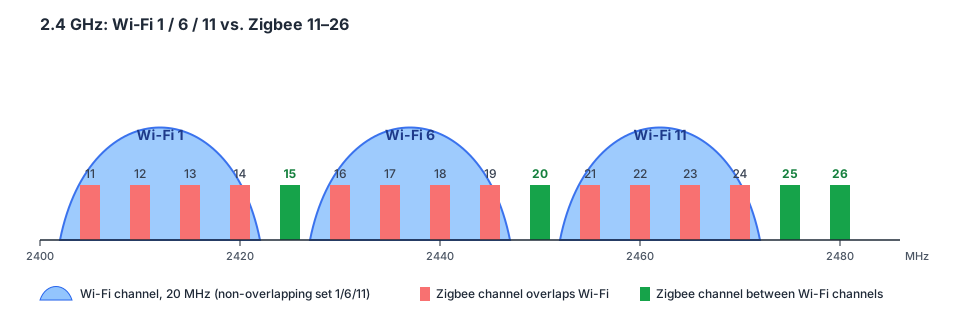
Zigbee channels 15, 20, 25 and 26 sit between Wi-Fi channels 1/6/11. The others overlap Wi-Fi. The diagram leaves out Wi-Fi channels 12 and 13 (EU), see Gotchas. Own diagram (Synthesis from channel frequencies).
Recommended coordinator for the home: SLZB network coordinator
Recommendation: for a home, the recommended alternative to a USB adapter (e.g. Connect ZBT-2) is an SMLIGHT SLZB-06 series network coordinator running SLZB-OS, connected over Ethernet with PoE. It works with both ZHA and Zigbee2MQTT.3
Why (Synthesis):
- The radio can sit in the middle of the flat or house, away from the rack, USB 3.0 and SSDs. That directly addresses the coordinator placement advice above.
- The HA or Z2M server can be a VM, Docker or NAS and needs no USB passthrough. Replacing or moving the server doesn't touch the radio.
- One PoE cable carries both data and power.
- Downside: it is one more network device with its own web UI that has to be secured and updated.
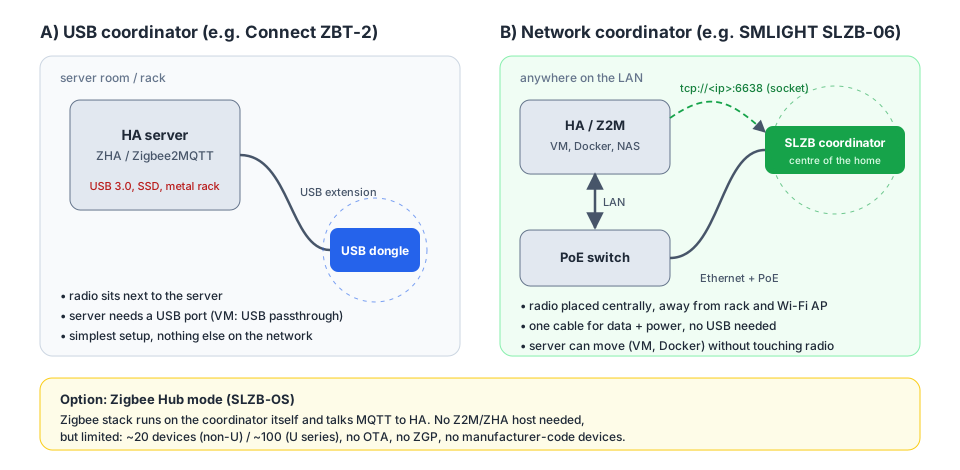
A USB dongle has to be next to the server; a network coordinator can be anywhere on the LAN. Own diagram (Synthesis) based on SLZB-OS manual3 and1.
How it connects
Step-by-step guide: Home Assistant Connect SLZB.
According to SLZB-OS manual3:
- Radio modes: Zigbee Coordinator (the usual choice), Zigbee Router (extends an existing network), OpenThread Border Router for Thread and Matter, or Zigbee Hub.
- Connection: Ethernet as serial over TCP (
tcp://<ip>:6638, default port 6638), USB as a classic dongle, or Wi-Fi with higher latency. For a home, Ethernet with PoE makes sense (Synthesis). - The configuration generator in SLZB-OS prints the adapter type (e.g. CC2652P7 = ZNP, EFR32MG21 = EZSP), port and baud rate. You just copy the values into the Zigbee2MQTT
configuration.yamlor the ZHA settings. - Up to 5 clients can connect to the socket, but only one may talk to the radio. So don't run ZHA and Z2M on the same coordinator at the same time.
Zigbee Hub mode: small networks only
The Zigbee stack runs on the coordinator itself and sends data to HA over MQTT, so no Z2M or ZHA server is needed. Limits according to SLZB-OS manual3:
- recommended maximum of 20 devices (non-U models), 100 for U-series
- no OTA updates for devices, no ZGP, and no devices that require a manufacturer code
- limited support for non-standard clusters
Synthesis: for a typical home with HA, Coordinator mode with ZHA or Z2M is the better choice. Zigbee Hub only suits a small standalone network.
Security
Vendor recommendations according to SLZB-OS manual3:
- Turn on web UI login and use a strong password.
- Set the socket IP whitelist to the HA or Z2M server only. Otherwise anyone on the network can connect to the coordinator.
- In normal operation, disable the web UI while the socket is connected. Turn it on only while configuring.
- Password-protect the fallback Wi-Fi AP. Keep Permit Join off most of the time.
- Synthesis: the coordinator belongs in an IoT or management VLAN. The socket is protected only by the IP whitelist.
ZBT-2 vs. SLZB-06
| Connect ZBT-2 | SLZB-06 (SLZB-OS) | |
|---|---|---|
| Connection | USB-C into a USB 2.0 port | Ethernet, PoE (model-dependent), USB, Wi-Fi |
| Placement | next to the server, or on an extension | anywhere on the LAN |
| Modes | Zigbee or Thread | Zigbee coordinator / router, Thread (OTBR), Zigbee Hub |
| Integration | ZHA, Zigbee2MQTT, OTBR (HA 2025.11+) | ZHA, Zigbee2MQTT (socket), MQTT |
| Management | in HA | own web UI, API, scripts |
| Downside | tied to the USB host | another network device to secure and update |
Gotchas
- Change the channel only on a fresh network, otherwise you have to re-pair devices.3
- Migrating from another CC26xx adapter works without re-pairing: turn off the old coordinator and the routers for ≥15 s, power on the new one, then the routers, and finally Z2M/ZHA. If that isn't enough, copy the old coordinator's IEEE address to the new one. This doesn't work in USB mode.3 Procedure E in Zigbee coordinator migration.
- SLZB-OS update v3.0.9 broke Zigbee Hub. Read the changelog before updating firmware.3
Integrations
- ZHA (Zigbee Home Automation): the native Home Assistant integration. Manages the coordinator and backups.1
- Zigbee2MQTT: a standalone service that translates between Zigbee and MQTT, with a converter per device model.2 Its network can be migrated to ZHA.1
- deCONZ: its network can be migrated to ZHA.1
- Hardware: Home Assistant Connect ZBT-2 (USB), SMLIGHT SLZB-06 (network, see above)
Related
- Home Assistant Connect ZBT-2
- ZHA, Zigbee2MQTT, Home Assistant
- Thread: same 802.15.4 radio
- Wi-Fi 7: Wi-Fi in 2.4 GHz, coexistence and IoT on Wi-Fi 4
Sources
- Home Assistant Connect ZBT-2 (Nabu Casa Support) ↗ — official ZBT-2 documentation. Interference, pairing, device limits, reset.
- Zigbee2MQTT documentation (Zigbee network, stability, binding, pairing) ↗ — general Zigbee description (roles, ZCL, binding, pairing, channels, interference).
- SLZB-OS (SMLIGHT Manuals) ↗ — SLZB-OS online manual. Source for the network coordinator section.
- SLZB-MR3 (SMLIGHT product page) ↗
- User Documentation for Home Assistant Connect ZBT-2 (DRAFT) ↗ — pre-release draft (superseded). Now only the source for the interference image, 24 h backups, USB 2.0 and removing the adapter.