 Intellihome
Home Assistant Connect SLZB
Goal: connect an SMLIGHT SLZB network Zigbee/Thread coordinator (e.g. SLZB-MR3) to Home Assistant over LAN with PoE. It's the recommended alternative to a USB adapter: the coordinator sits in the middle of the home, a single cable powers it, and HA can run anywhere on the network, even in a container. See Zigbee.
Prerequisites: an SLZB with SLZB-OS (core firmware ≥ v2.3.6, ≥ v2.8.x on multi-radio models), a PoE switch (802.3af, e.g. UniFi), HA 2026.x. HA docs SLZB-MR3 page
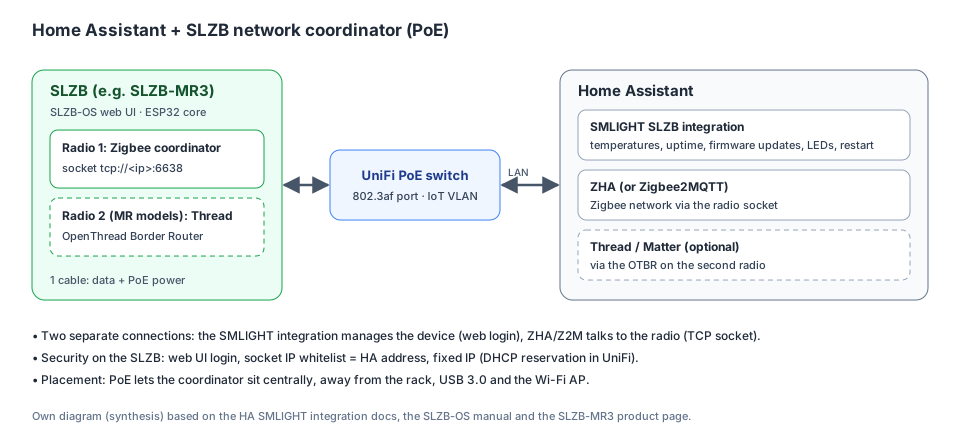
Two separate connections: the SMLIGHT integration manages the device, ZHA or Z2M talks to the radio via the socket. Own diagram (Synthesis) based on HA docs, SLZB-OS manual and SLZB-MR3 page.
How it works
- The SMLIGHT SLZB integration in HA manages the device itself: core and Zigbee chip temperatures, uptime, RAM, connection mode, firmware type, restart, LEDs and firmware updates (core and Zigbee). HA docs
- The Zigbee network is run by ZHA or Zigbee2MQTT. It talks to the SLZB radio via a TCP socket (
tcp://<ip>:6638). SLZB-OS manual - On multi-radio models (MR1–MR5), the second radio can run as an OpenThread Border Router for Thread and Matter alongside Zigbee. SLZB-MR3 page HA docs
Procedure
- Plug the SLZB into a PoE port on the switch. 802.3af is enough; the MR3 draws up to 1.5 W. SLZB-MR3 page
- Fixed IP: in your network device (e.g. UniFi Network), give the SLZB a DHCP reservation, ideally in an IoT or management VLAN. Synthesis: the socket and the integration connect to the IP address, so it must not change.
- SLZB web UI (
http://<ip>):- Update the core firmware.
- In Mode, set radio 1 to Zigbee Coordinator and the connection to Ethernet. On MR models you can switch radio 2 to OpenThread Border Router.
- The configuration generator in the Z2M/ZHA section prints the adapter type and port. On dual-radio models each radio has its own settings.
- Source: SLZB-OS manual
- Security in SLZB-OS SLZB-OS manual:
- Enable web UI login with a strong password.
- Set the socket IP whitelist to the HA (or Z2M) address.
- Password-protect the fallback Wi-Fi AP.
- SMLIGHT SLZB integration in HA: Settings → Devices & services → Add integration → SMLIGHT SLZB. Enter the host (IP) and the SLZB web login. HA docs
- ZHA: Add integration → Zigbee Home Automation → enter the SLZB socket as the port, per the configuration generator. SLZB-OS manual For Zigbee2MQTT, put the generator's values into
configuration.yamlinstead. Z2M docs - Thread (optional): the second radio as an OTBR. Connect it in HA via the Thread and OTBR integrations. SLZB-MR3 page
- Pair devices: routers (plugs, bulbs) first, then battery devices, always in their final location. See Zigbee.
Verification
- HA shows an SMLIGHT device with entities. The Zigbee uptime sensor shows how long the ZHA or Z2M connection has been up, and Connection mode = Ethernet. HA docs
- The SLZB-OS dashboard shows "Socket connected". SLZB-OS manual
- On MR models there are entities for the second radio too (core ≥ v2.8.x). HA docs
Practical tips (automations)
According to HA docs:
- Off-peak updates: an automation installs core or Zigbee firmware, e.g. Tuesday at 3:00.
- Temperature watch: a notification when Core or Zigbee temperature exceeds e.g. 65 °C. Useful in a cabinet or under the roof.
- LEDs at night: the Disable LEDs or LED night mode switch in sleep mode.
Gotchas
- The firmware mode (coordinator, router, Thread), update channel, network, security and VPN are set only in the SLZB web UI, not from HA. HA docs
- The Zigbee type sensor only works with official firmware installed via OTA in the SLZB web UI. HA docs
- The integration polls sensors every 5 minutes and checks for firmware updates once a day. HA docs
- After a firmware update you can always roll back to the previous stable version in the web UI. HA docs
- Up to 5 clients can connect to the socket, but only one may talk to the radio. Don't run ZHA and Z2M on the same radio at once. SLZB-OS manual
Rollback
- Synthesis: the SMLIGHT integration can be removed without side effects (standard removal). HA docs The Zigbee network is stored on the SLZB radio and in the ZHA backup, see Zigbee coordinator migration.
Related
Sources
- HA docs: the SMLIGHT SLZB integration in HA.
- SLZB-OS manual: modes, socket, configuration generator, security.
- SLZB-MR3 page: two radios, PoE.
- UniFi Help Center: PoE switches and VLANs in UniFi.
- Z2M docs: the Zigbee2MQTT variant.