 Intellihome
UniFi
What it is: Ubiquiti's ecosystem of networking and security devices with licence-free management. A UniFi OS console (typically a Cloud Gateway) runs the apps Network (gateway, switches, Wi-Fi), Protect (cameras), Access (doors and entry), Talk (telephony) and Connect. UniFi Help Center For the smart home it's a stable backbone: PoE for cameras, readers and Zigbee coordinators, VLANs for IoT, and integrations into Home Assistant. HA docs
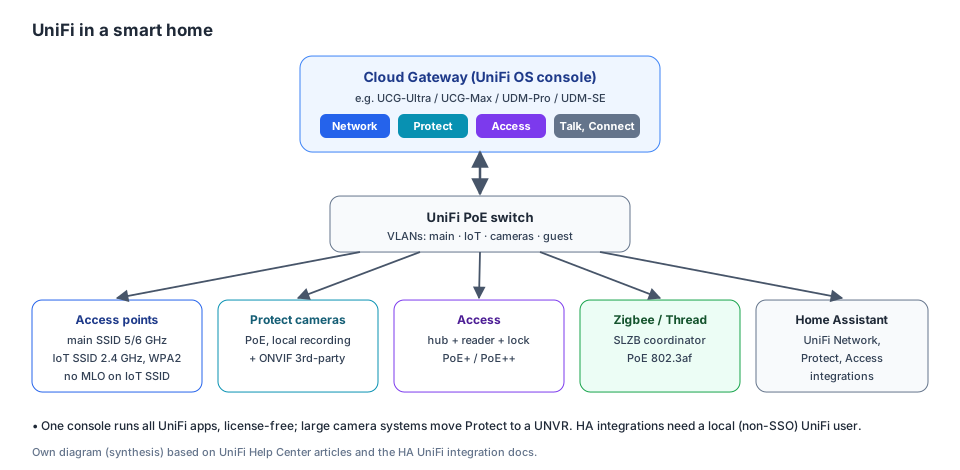
A console with apps, a PoE switch with VLANs, and connected devices including a Zigbee coordinator and HA. Own diagram (Synthesis) based on UniFi Help Center and HA docs.
Intellihome recommendation
The setup I build for customers (tested in practice), extended with whatever the customer comes up with:
| Role | Recommended device | Why (Synthesis based on UniFi Help Center) |
|---|---|---|
| Gateway and Wi-Fi | UDR7 (Dream Router 7) | a Cloud Gateway with Wi-Fi 7 and UniFi Network. It also supports Access. |
| Camera recording and Access | CloudKey+ (UCK-G2-Plus) | the UDR7 handles only 1 4K or 5 HD cameras. A CloudKey+ with Protect handles 8× 4K or 24× HD and supports Access. |
| Wi-Fi coverage | UniFi APs to suit the layout | Wi-Fi 6/7, a separate 2.4 GHz IoT SSID |
| Switches | UniFi PoE switches | powering cameras, Access and the SLZB Zigbee coordinator |
| Cameras | G5 Turret Ultra or a higher line | UniFi Protect, PoE |
| Entry | Access: G3 Reader Pro, hub and more | card, phone, face, QR, PIN |
Setup source: Intellihome recommendation. Camera limits and Access support: UniFi Help Center.
Contradiction
The "Choosing the Right UniFi Control Plane" article says the CloudKey+ supports "up to 12 cameras". The "Supported Camera Limits" table (09/2026) gives 24 HD / 14 2K / 8 4K, but assuming the CloudKey+ runs Protect only; with UniFi Network the limit is lower. UniFi Help Center Synthesis: in the UDR7 + CloudKey+ setup, Network runs on the UDR7 and the CloudKey+ runs Protect (and Access), so the higher figures apply more. Plan with some headroom to be safe.
Devices and what they're for
UniFi OS console (Cloud Gateway)
UI recommends starting with a Cloud Gateway: gateway, firewall and management in one. UniFi Help Center
| Model | For | Note |
|---|---|---|
| UCG-Ultra | flat, smaller house | entry level, 1 Gbps routing, compact |
| UCG-Max | house | 2.3 Gbps routing, all apps |
| UDM-Pro / UDM-SE | house with a rack | 3.5 Gbps routing, all apps |
| UDM-Pro-Max | larger installs, more cameras | more CPU and RAM, second HDD for recording |
| EFG | enterprise | 25 GbE, runs Network only |
Table source: UniFi Help Center. The "For" column is Synthesis based on performance and form factor.
- Large camera systems belong on a UNVR or ENVR, which run only Protect and Access. A CloudKey+ handles up to 12 cameras. UniFi Help Center
Network: switches and Wi-Fi
- PoE switches power cameras, Access, and e.g. an SLZB Zigbee coordinator (802.3af). UniFi Help Center SLZB-MR3 page
- VLANs: separate the main network, IoT, cameras and guests. PPSK allows multiple passwords on one SSID, each into a different VLAN. UniFi Help Center Principles and the setup procedure (networks, ports, firewall zones, mDNS proxy, Matter) are on the VLAN page.
- Wi-Fi at home: channel width 20 MHz on 2.4 GHz, 80 MHz on 5 GHz and 160–320 MHz on 6 GHz. High transmit power unless APs are close together. Channel AI. A stable connection needs an RSSI of −70 dBm or better. UniFi Help Center More on Wi-Fi 7 and 6 GHz in Wi-Fi 7.
Protect: cameras
- Local recording, AI detections, remote management, no licences. Cameras are powered from a PoE switch. UniFi Help Center
- It also supports ONVIF third-party cameras, so you can migrate gradually. UniFi Help Center
- With a CloudKey or NVR and multiple VLANs, cameras must be on the same VLAN as the console. UniFi Help Center
Access: doors and entry
- Components: a console with Access, an Access hub (to the lock), a reader and a compatible lock. PoE power: Access Ultra PoE+, Door Hub, Hub Mini, Elevator and Gate Hub PoE++. UniFi Help Center
- Unlock by card, face, QR code or phone. A Retrofit Hub replaces an existing system without new wiring. UniFi Help Center
Talk, Connect
- Further apps on the same console (telephony, Connect). UniFi Help Center Marginal for the smart home so far.
Wi-Fi for the smart home (IoT)
According to UniFi Help Center:
- A separate IoT SSID: 2.4 GHz only and WPA2. On U7 (Wi-Fi 7) this is the recommended fix when IoT won't connect. For legacy IoT there's an IoT option in WiFi Optimization.
- Don't enable MLO on the IoT SSID. It turns on WPA3, which can limit IoT.
- Leave PMF on Optional (default). Required can break older clients.
- Don't raise Minimum Data Rate; it could block slow legacy IoT.
- Client Device Isolation suits IoT and guest SSIDs when devices don't need to see each other. Synthesis: HomeKit and Chromecast discovery need devices to see each other, so isolate with care.
- Multicast Enhancement helps with Apple TV, Sonos and Chromecast.
- Details on IoT and 2.4 GHz: Wi-Fi 7.
Connecting to Home Assistant
According to HA docs:
| Integration | What it does | Watch out |
|---|---|---|
| UniFi Network | presence from Wi-Fi clients, scheduled Wi-Fi, per-port PoE (restart a camera or AP), firewall and traffic rules, updates | needs a local user; Ubiquiti SSO accounts don't work |
| UniFi Protect | cameras, sensors and events | only on a UniFi OS console (not self-hosted), Protect 7.2.105+, local user + API key |
| UniFi Access (HA 2026.4+) | unlocking, door status, doorbell, events | API key from the Access app, not from the console's Integrations page |
Gotchas
- An SSO account isn't enough. HA integrations need a local user on the console; an admin restricted to local access is recommended. HA docs
- The EFG runs Network only; Protect and Access then need a separate console. UniFi Help Center
- UniFi Protect isn't available for self-hosting; HA doesn't support unofficial container ports. HA docs
- Zigbee and Wi-Fi share 2.4 GHz. The Wi-Fi channel and the Zigbee coordinator's channel must be coordinated, see Zigbee.
Related
Sources
- UniFi Help Center: the official UI Help Center (consoles, Protect, Access, Wi-Fi for IoT).
- HA docs: the UniFi Network, Protect and Access integrations in HA.
- SLZB-MR3 page: PoE on the SLZB.